
Read a PDF or a book in another language, without translating all of it
A contract from your landlord. A paper for your course. A manual, a letter from the tax office, the novel everyone at work is reading. Import it, read it as it is, and tap the words that stop you.

Why not just translate it?
A full machine translation is fine for getting the gist. It is not the text you were sent. Names, numbers and careful wording shift, and you lose the chance to check what the original actually says. Reading the original with help on the hard words keeps you on the real document.
How it works
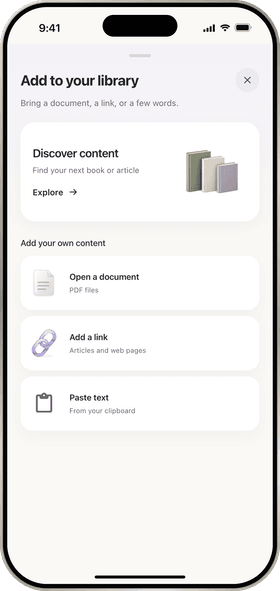
- Import it. Open a PDF from Files (up to 100 MB), add a link to a web article, paste text, or share it to ContextCat from another app. Books from the Store are ready to read.
- Read it as it is. ContextCat turns the pages into clean text you can read on a phone, with the figures kept.
- Tap what stops you. The note under the sentence says what the word means here, in your language. Select a sentence to translate it.
- Ask when a paragraph is unclear. Ask answers from the document itself: what a clause means, what the author is arguing, what the figures show.
- Or listen. Listen reads the document aloud with each sentence highlighted, so long reads get easier.
Reading mode
If you are not studying the language, choose reading mode. ContextCat keeps the reader simple, and tapping a word still explains it.
Good to know
- ContextCat imports PDF files, web links and pasted text. It does not open EPUB or Word files yet.
- It reads 39 languages and explains in any of them: an English paper explained in Arabic, a German letter explained in Turkish.
- The free plan includes 3 imports and 25 word explanations. ContextCat Pro removes the limits. See pricing.
- The explanations are written by AI. Check anything with legal or medical weight with a person who knows.
Questions
Can ContextCat translate a PDF?
- It does something different on purpose. The PDF stays in its language and you tap only the words you need, which explain what they mean in that sentence, in your language. Select a sentence when you want a translation of that sentence. Ask answers questions about the whole document.
What kinds of PDFs work?
- Text documents work best: reports, papers, contracts, letters, manuals and books. ContextCat turns the pages into clean text and keeps figures. Files can be up to 100 MB. Scanned pages with handwriting may not come out well.
Do I have to be learning the language?
- No. Choose reading mode and ContextCat keeps to reading: a tap still explains the word, without study features around it.
Is my document private?
- Your documents are stored so you can read them in the app, and parts of them are sent to AI services to write explanations, answers and audio. ContextCat does not sell data or show ads. The privacy policy has the details.
Related
- How to read a PDF in another language, word by wordA practical method for getting through a document you only half understand.
- How to read books in English as a non-native speakerChoosing the first book, how often to look things up, and when to keep going.
- PDFs, links and booksEverything about bringing your own texts into ContextCat.