
Your PDFs, links and books, with every word explained
Bring what you actually need to read: a PDF from work or school, an article you found, a letter, a chapter. ContextCat turns it into pages you can read and tap.

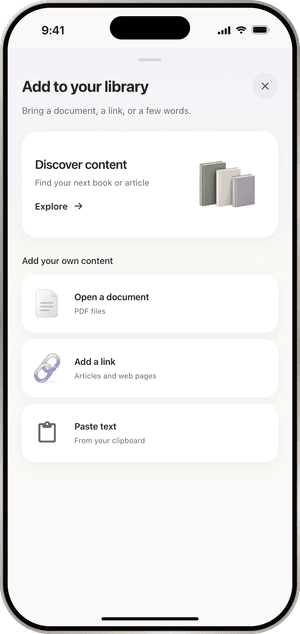
Three ways in
Open a document picks a PDF from Files, up to 100 MB. ContextCat turns its pages into clean text you can read and tap, and keeps the figures.
Add a link takes any web article. Paste text takes anything you copied, from an email to a lyric. You can also share a page or a file to ContextCat from another app and import it when you are ready.
ContextCat reads PDF files. It does not open EPUB or Word files yet.
The Store
The Store tab has books and articles to start with, such as classics that are now in the public domain. How much there is depends on the language: English has the most.
Reading, not studying
If you only need to understand a document and not learn the language, choose reading mode. Tapping a word still explains it, without the study features around it.
Free: 3 imports. ContextCat Pro: unlimited imports. Pricing
Questions
Does ContextCat translate the whole PDF?
- No. The document stays in its language, and you tap the words or select the sentences you need. That keeps you reading the original and still gets you through it.
Can I read EPUB books?
- Not yet. Today ContextCat imports PDFs, web links and pasted text.
More of ContextCat
- Tap any wordTap a word in anything you read and ContextCat explains what it means in that sentence, in your own language, right under the line you are reading.
- Today's newsEvery day ContextCat collects headlines from real outlets in the language you read. Open one, read it in the app and tap any word you do not know.
- AskAsk a question about a page, a paragraph or your whole document and get an answer from the text, or ask ContextCat to quiz you on what you just read.
- ListenContextCat reads your book, PDF or article aloud in a natural voice, sentence by sentence, highlighting the words as they are spoken, with speed and repeat controls.
- CardsEvery word you tap in ContextCat is saved with its sentence and comes back as a card just before you would forget it, using spaced repetition.
- StoriesComing in ContextCat 1.1: short stories written at your level, and a daily serial for English learners, two minutes an episode. What exists today and what is next.