
Listen while you read
Press Listen and ContextCat reads the page aloud in a natural voice, sentence by sentence, highlighting each one as it goes. Read along, or put the phone down and keep listening.

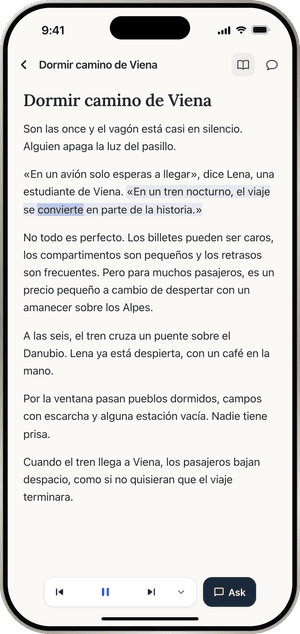
Hear how it sounds
The sentence being read and the word being spoken are highlighted, so your eyes and ears stay together. Tap a word while it plays and the reading pauses for the explanation, then picks up where it was.
Speeds go from 0.5x to 2x. Listening carries on across pages, and on the lock screen, in Control Center and with AirPods.
Repeat after me
Turn on a pause after each sentence to say it yourself, or have each sentence played twice. Loop one sentence until you have it.
Words on their own
Every explanation has a speaker for the word alone, and a saved word's card plays the sentence you met it in.
Where it works
Listen works on Store books, PDFs, links and pasted texts. It is not available on news articles from Today, and it has no Maltese or Albanian voice yet. The voices are AI-generated, and the app says so.
Free: a short trial. ContextCat Pro: about two hours of new audio a day. Pricing
Questions
Can I listen with the screen off?
- Yes. Listening keeps going on the lock screen and with AirPods, and you can pause, skip back or skip ahead from there.
More of ContextCat
- Tap any wordTap a word in anything you read and ContextCat explains what it means in that sentence, in your own language, right under the line you are reading.
- Today's newsEvery day ContextCat collects headlines from real outlets in the language you read. Open one, read it in the app and tap any word you do not know.
- PDFs, links and booksImport a PDF, save a link to any web article or paste text, then read it in ContextCat and tap any word for its meaning in that sentence, in your language.
- AskAsk a question about a page, a paragraph or your whole document and get an answer from the text, or ask ContextCat to quiz you on what you just read.
- CardsEvery word you tap in ContextCat is saved with its sentence and comes back as a card just before you would forget it, using spaced repetition.
- StoriesComing in ContextCat 1.1: short stories written at your level, and a daily serial for English learners, two minutes an episode. What exists today and what is next.