
Tap any word. See what it means here.
A dictionary gives you every meaning a word has. ContextCat gives you the one this sentence uses, explained in your own language, right under the line you are reading.

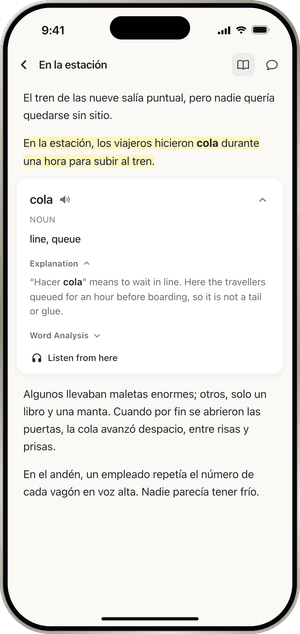
What you see when you tap
The word turns bold and its sentence is highlighted. A note opens under the sentence with the word, how it sounds, its part of speech and a short meaning in your language.
Below that is the part a dictionary cannot give you: what the word means in this sentence. In "hicieron cola durante una hora", cola is a queue, not a tail, glue or a soft drink, and the note says so.
Open Word analysis for the root and the form, such as which verb a past participle comes from. Listen from here starts reading aloud from that sentence.
Whole sentences too
Select a few words or a whole sentence to get a translation of just that part. It helps with idioms and long sentences where every word is clear and the meaning still is not.
Languages without spaces
Japanese, Chinese and Thai do not put spaces between words. ContextCat cuts the text into words on your iPhone, so a tap lands on a word, not a single character or half a phrase.
Written in your language
You choose your own language when you start, and every explanation is written in it. ContextCat works in 39 languages, both for reading and for explanations.
The explanations are written by AI language models from the sentence around the word. They are right far more often than a word-for-word lookup, and now and then they are wrong. When something matters, check it.
Free: 25 word explanations to try, and 15 sentence translations a day. ContextCat Pro: unlimited. Pricing
Questions
Is it a translator?
- No. ContextCat leaves the text in the language you are reading and explains only the word you tap, in the sentence you found it in. You can translate a selected sentence when you need to.
What happens to the words I tap?
- They are saved with the sentence you met them in, and come back later as Cards for review, so a word you looked up once has a chance to stay.
More of ContextCat
- Today's newsEvery day ContextCat collects headlines from real outlets in the language you read. Open one, read it in the app and tap any word you do not know.
- PDFs, links and booksImport a PDF, save a link to any web article or paste text, then read it in ContextCat and tap any word for its meaning in that sentence, in your language.
- AskAsk a question about a page, a paragraph or your whole document and get an answer from the text, or ask ContextCat to quiz you on what you just read.
- ListenContextCat reads your book, PDF or article aloud in a natural voice, sentence by sentence, highlighting the words as they are spoken, with speed and repeat controls.
- CardsEvery word you tap in ContextCat is saved with its sentence and comes back as a card just before you would forget it, using spaced repetition.
- StoriesComing in ContextCat 1.1: short stories written at your level, and a daily serial for English learners, two minutes an episode. What exists today and what is next.